The 8 Levels of Agentic Engineering
AI's coding ability is outpacing our ability to wield it effectively. That's why all the SWE-bench score maxxing isn't syncing with the productivity metrics engineering leadership actually cares about. When Anthropic's team ships a product like Cowork in 10 days and another team can't move past a broken POC using the same models, the difference is that one team has closed the gap between capability and practice and the other hasn't.
That gap doesn't close overnight. It closes in levels. 8 of them. Most of you reading this are likely past the first few, and you should be eager to reach the next one because each subsequent level is a huge leap in output, and every improvement in model capability amplifies those gains further.
The other reason you should care is the multiplayer effect. Your output depends more than you'd think on the level of your teammates. Say you're a level 7 wizard, raising several solid PRs with your background agents while you sleep. If your repo requires a colleague's approval before merge, and that colleague is on level 2, still manually reviewing PRs, that stifles your throughput. So it is in your best interest to pull your team up.
From talking to several teams and individuals practicing AI-assisted coding, here's the progression of levels I've seen play out, imperfectly sequential:
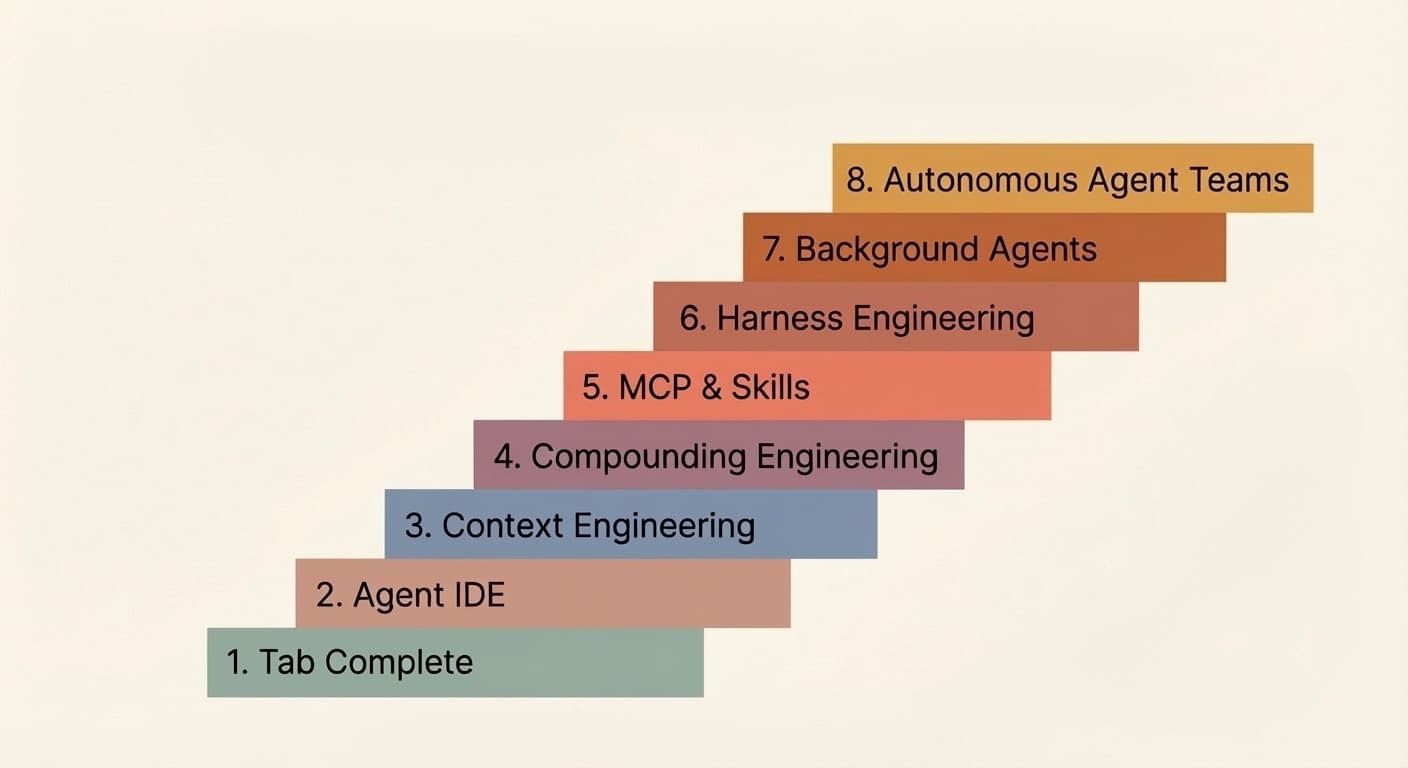
Levels 1 & 2: Tab Complete and Agent IDE
I'll address these two zippily, mostly for posterity. Skim freely.
It started with Copilot and tab complete. Click tab, autocomplete code. Probably long forgotten by many and skipped entirely by new entrants to agentic engineering. It favored experienced devs who could adeptly skeleton their code before AI filled in the blanks.
AI-focused IDEs like Cursor changed the game by connecting chat to your codebase, making multi-file edits dramatically easier. But the ceiling was always context. The model could only help with what it could see, and annoyingly often, it was either not seeing the right context or seeing too much of the wrong context.
Most people at this level are also experimenting with plan mode in their coding agent of choice: translating a rough idea into a structured step-by-step plan for the LLM, iterating on that plan, and then triggering the implementation. It works well at this stage, and it's a reasonable way to maintain control. Though we'll see in later levels less of a dependence on plan mode.
Level 3: Context Engineering
Buzz phrase of the year in 2025, context engineering became a thing when models got reliably good at following a reasonable number of instructions with just the right amount of context. Noisy context was just as bad as underspecified context, so the effort was in improving the information density of each token. "Every token needs to fight for its place in the prompt" was the mantra.
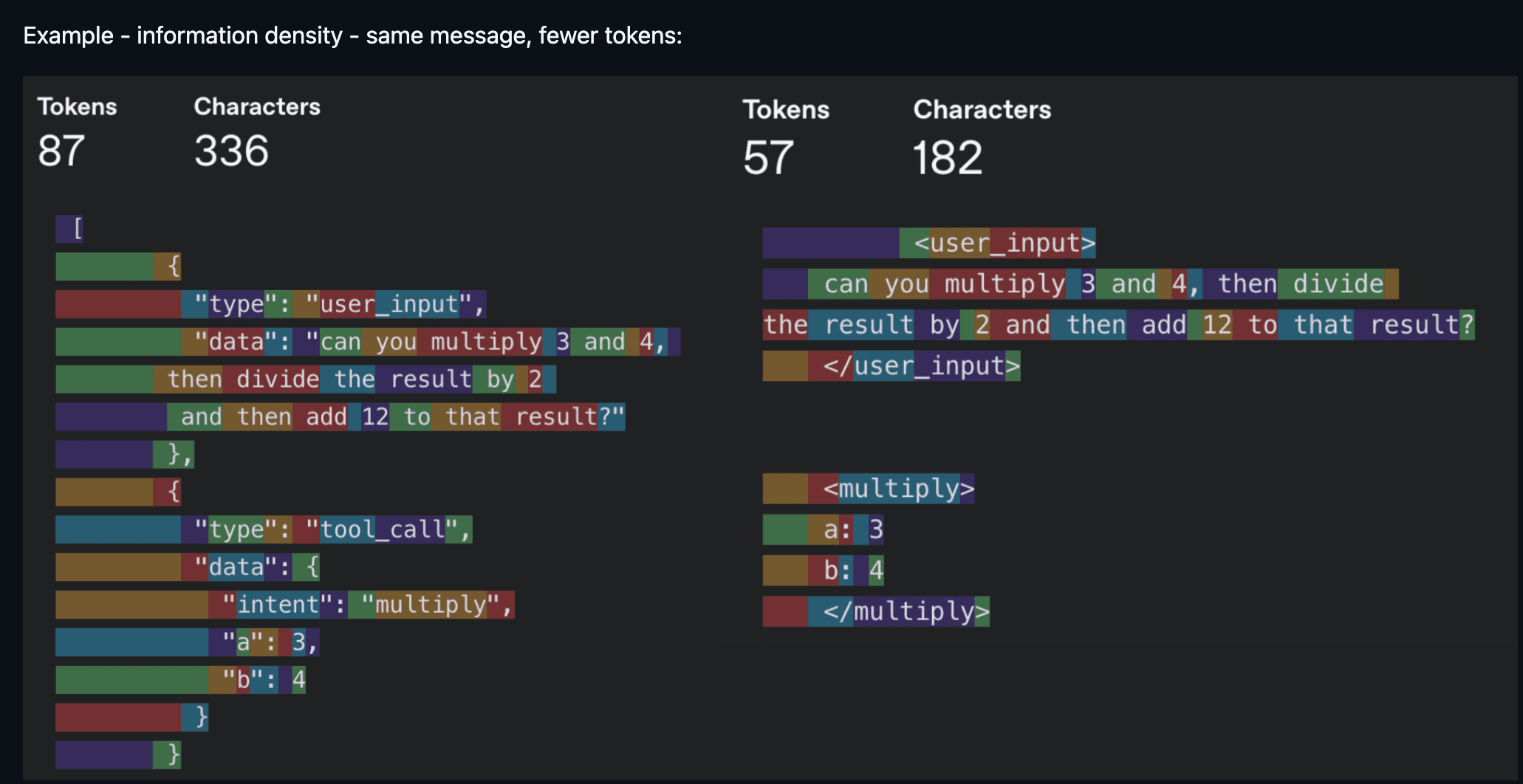
In practice, context engineering touches more surface area than people realize. It's your system prompt and rules files (.cursorrules, CLAUDE.md). It's how you describe your tools, because the model reads those descriptions to decide which ones to call. It's managing conversation history so a long-running agent doesn't lose the plot ten turns in. It's deciding which tools to even expose per turn, because too many options overwhelm the model just like they overwhelm people.
You don't hear as much about context engineering these days. The scale has tipped in favor of models that forgive noisier context and reason through messier terrain (larger context windows help too). Still, being mindful of what eats up context remains relevant. A few examples of where it still bites:
- Smaller models are more context-sensitive. Voice applications often use smaller models, and context size also correlates with time to first token, which affects latency.
- Token-heavy tools and modalities. MCPs like Playwright and image inputs burn through tokens fast, pushing you into "compact session" state in Claude Code way sooner than you'd expect.
- Agents with access to dozens of tools, where the model spends more tokens parsing tool schemas than doing useful work.
The broader point is that context engineering hasn't gone away, it's just evolved. The focus has shifted from filtering out bad context to making sure the right context is present at the right time. That shift is what sets up level 4.
Level 4: Compounding Engineering
Context engineering improves the current session. Compounding engineering improves every session after it. Popularized by Kieran Klaassen, compounding engineering was an inflection point for not only me but many others that "vibe coding" could do far more than just prototyping.
It's a plan, delegate, assess, codify loop. You plan the task with enough context for the LLM to succeed. You delegate it. You assess the output. And then, crucially, you codify what you learned: what worked, what broke, what pattern to follow next time.
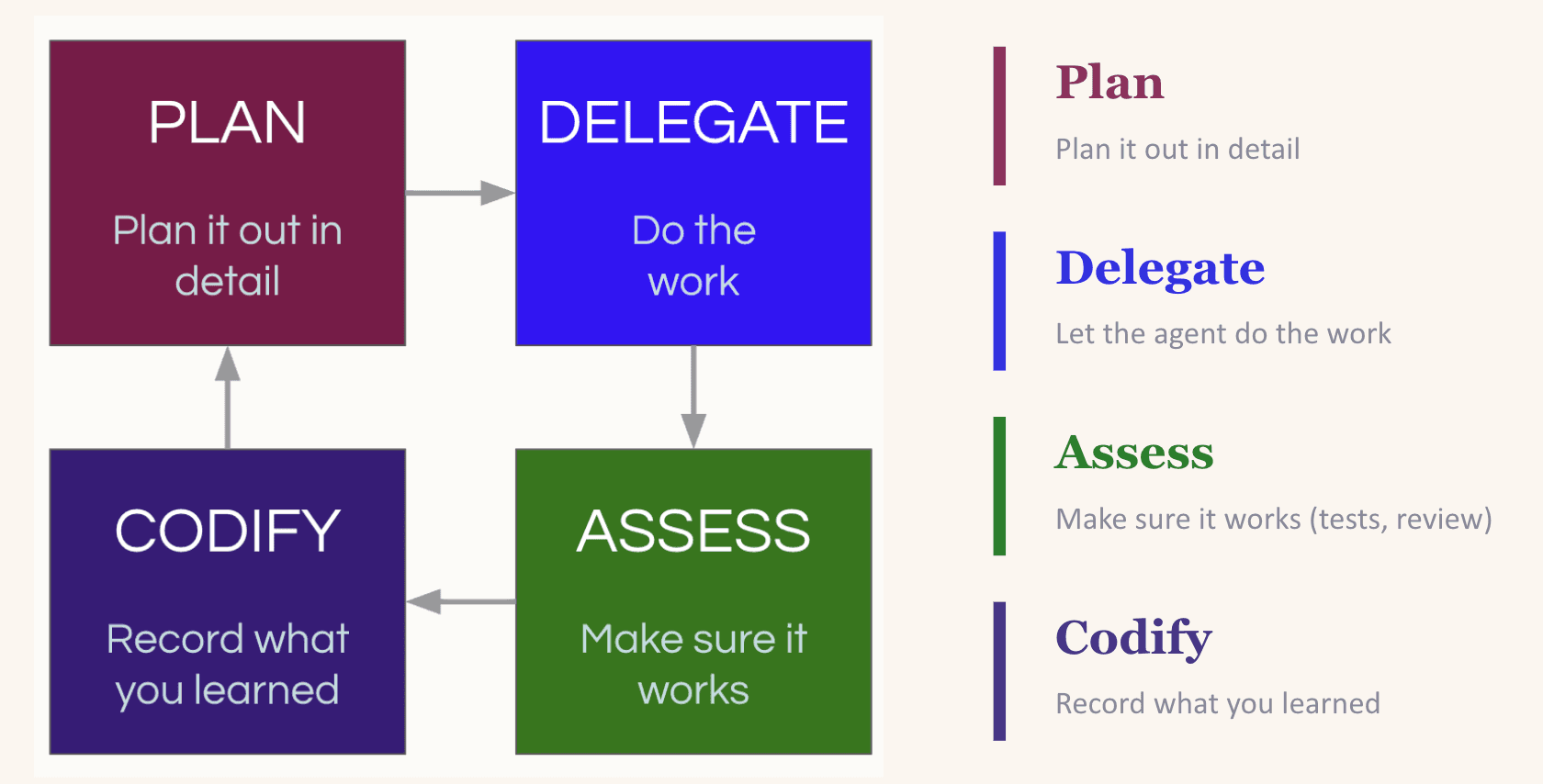
That codify step is what makes it compound. LLMs are stateless. If they re-introduce a dependency you explicitly removed yesterday, they'll do it again tomorrow unless you tell them not to. The most common way to close that loop is updating your CLAUDE.md (or equivalent rules file) so the lesson is baked into every future session. A word of caution: the instinct to codify everything into your rules file can backfire (too many instructions is as good as none). The better move is to create a setting where the LLM can easily discover useful context on its own, for example by maintaining an up-to-date docs/ folder (more on this in Level 7).
Practitioners of compounding engineering are usually hyper-aware of the context being fed to their LLM. When an LLM makes a mistake, they instinctively think about missing context before blaming the model's competence. That instinct is what makes levels 5 through 8 possible.
Level 5: MCP and Skills
Levels 3 and 4 solve for context. Level 5 solves for capability. MCPs and custom skills give your LLM access to your database, your APIs, your CI pipeline, your design system, Playwright for browser testing, Slack for notifications. Instead of just thinking about your codebase, the model can now act on it.
There's no shortage of good material on MCPs and skills already, so I won't rehash what they are. But here are some examples of how I use them: my team shares a PR review skill that we've all iterated on (and still do) that conditionally launches subagents depending on the nature of the PR. One handles integration safety with the database. Another runs complexity analysis to flag redundancies or overengineering. Another checks prompt health to ensure our prompts follow the team's standard format. It also runs linters and Ruff.
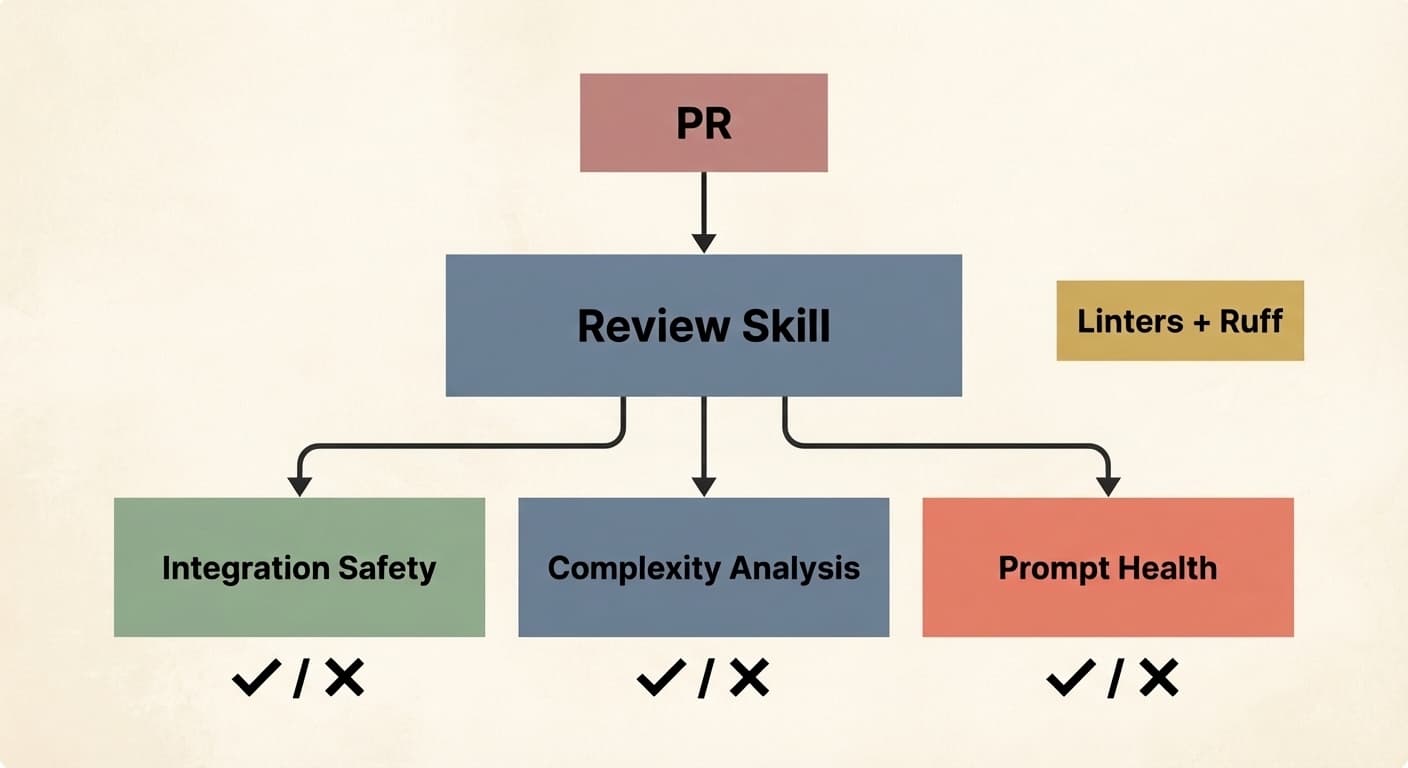
Why invest this much in a review skill? Because as agents start producing PRs at volume, human review becomes the bottleneck, not the quality gate. Latent Space makes a compelling case that code review as we know it is dead. Automated, consistent, skill-driven review is what replaces it.
On the MCP side, I use the Braintrust MCP so my LLM can query evaluation logs and make changes directly. I use DeepWiki MCP to give my agent access to documentation for any open-source repo without manually pulling it into context.
Once multiple people on your team are writing their own versions of the same skill, it's worth consolidating into a shared registry. Block (my condolences) has a great write-up on this: they built an internal skills marketplace with over 100 skills and curated bundles for specific roles and teams. Skills get the same treatment as code: pull requests, reviews, version history.
One more trend worth calling out: it's becoming common for LLMs to use CLI tools instead of MCPs (and it seems like every company is shipping one: Google Workspace CLI, Braintrust is launching one soon). The reason is token efficiency. MCP servers inject full tool schemas into context on every turn whether the agent uses them or not. CLIs flip this: the agent runs a targeted command, and only the relevant output enters the context window. I use agent-browser heavily for exactly this reason versus using the Playwright MCP.
One thing before we continue. Levels 3 through 5 are the building blocks for everything that follows. LLMs are unpredictably good at some things and bad at others, and you need to develop an intuition for where those edges are before stacking more automation on top. If your context is noisy, your prompts are under- or misspecified, or your tools are poorly described, levels 6 through 8 just amplify the mess.
Level 6: Harness Engineering & Automated Feedback Loops
This is where the rocket really starts to ship.
Context engineering is about curating what the model sees. Harness engineering is about building the entire environment, tooling, and feedback loops that let agents do reliable work without you intervening. Give the agent the feedback loop, not just the editor.
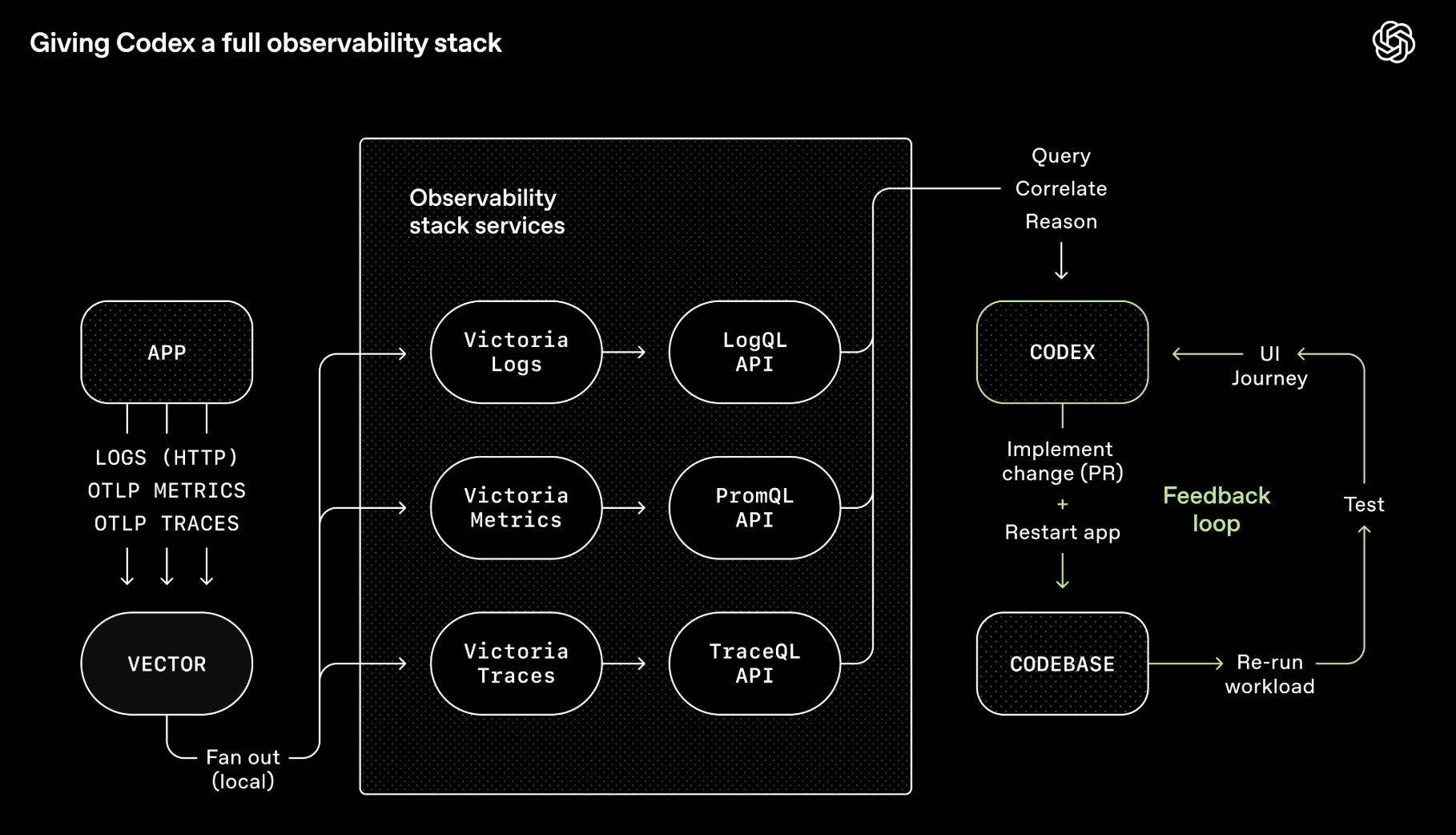
OpenAI's Codex team wired Chrome DevTools, observability tooling, and browser navigation into the agent runtime so it could take screenshots, drive UI paths, query logs, and validate its own fixes. Given a single prompt, the agent can reproduce a bug, record a video, and implement a fix. Then it validates by driving the app, opens a PR, responds to review feedback, and merges, escalating only when judgment is required. The agent doesn't just write code. It can see what the code produces and iterate on it, the same way a human would.
My team builds voice and chat agents for tech troubleshooting, so I built a CLI tool called converse that lets any LLM chat with our backend endpoint and have turn-by-turn conversations. The LLM makes code changes, uses converse to test conversations against the live system, and iterates. Sometimes these self-improvement loops run for several hours on end. This is especially powerful when the outcome is verifiable: the conversation must follow this flow, or call these tools in these situations (e.g., escalation to a human agent).
The concept that enables this is backpressure: automated feedback mechanisms (type systems, tests, linters, pre-commit hooks) that let agents detect and correct mistakes without human intervention. If you want autonomy, you need backpressure. Otherwise you end up with a slop machine. This extends to security too. Vercel's CTO makes the case that agents, the code they generate, and your secrets should live in separate trust domains, because a prompt injection buried in a log file can trick an agent into exfiltrating your credentials if everything shares one security context. Security boundaries are backpressure: they constrain what an agent can do when it goes off the rails, not just what it should do.
Two things that help here:
- Design for throughput, not perfection. When perfection is required per commit, agents pile on the same bug and overwrite each other's fixes. Better to tolerate small non-blocking errors and do a final quality pass before release. We do the same for our human colleagues.
- Constraints > instructions. Step-by-step prompting ("do A, then B, then C") is increasingly outdated. In my experience, defining boundaries works better than giving checklists, because agents fixate on the list and ignore anything not on it. The better prompt is "here's what I want, work on it until you pass all these tests."
The other half of harness engineering is making sure the agent can navigate your repo without you. OpenAI's approach: keep AGENTS.md to roughly 100 lines that serve as a table of contents pointing to structured docs elsewhere, and make documentation freshness part of CI rather than relying on ad hoc updates that go stale.
Once you've built all of this, a natural question emerges: if the agent can verify its own work, navigate the repo, and correct its mistakes without you, why do you need to be in the chair at all?
Heads up, for folks in the early levels, this next section may sound alien (but hey, bookmark and come back to it).
Level 7: Background Agents
Hot take: plan mode is dying.
Boris Cherny, creator of Claude Code, still starts 80% of tasks in plan mode today. But with each new model generation, the one-shot success rate after planning keeps climbing. I think we're approaching the point where plan mode as a separate human-in-the-loop step fades away. Not because planning doesn't matter, but because models are getting good enough to plan well on their own. Big caveat: this only works if you've done the work in levels 3 through 6. If your context is clean, your constraints are explicit, your tools are well-described, and your feedback loops are tight, the model can plan reliably without you reviewing it first. If you haven't done that work, you'll still need to babysit the plan.
To be clear, planning as a general practice isn't going away. It's just changing shape. For newer practitioners, plan mode remains the right entry point (as described in Levels 1 and 2). But for complex features at Level 7, "planning" looks less like writing a step-by-step outline and more like exploration: probing the codebase, prototyping options in worktrees, mapping the solution space. And increasingly, background agents are doing that exploration for you.
This matters because it's exactly what unlocks background agents. If an agent can generate a solid plan and execute without needing you to sign off, it can run asynchronously while you do something else. That's the critical shift from "multiple tabs I'm juggling" to "work that's happening without me."
The Ralph loop is the popular entry point: an autonomous agent loop that runs a coding CLI repeatedly until all PRD items are complete, where each iteration spawns a fresh instance with clean context. In my experience, getting the Ralph loop right is hard and any under/misspecification of the PRD comes back to bite. It's a little too fire-and-forget.
You can run multiple Ralph loops in parallel, but the more agents you spin up, the more you notice where your time actually goes: coordinating them, sequencing work, checking output, nudging things along. You're not writing code anymore. You've become a middle manager. You need an orchestrator agent that handles the dispatch so you can stay focused on intent, not logistics.
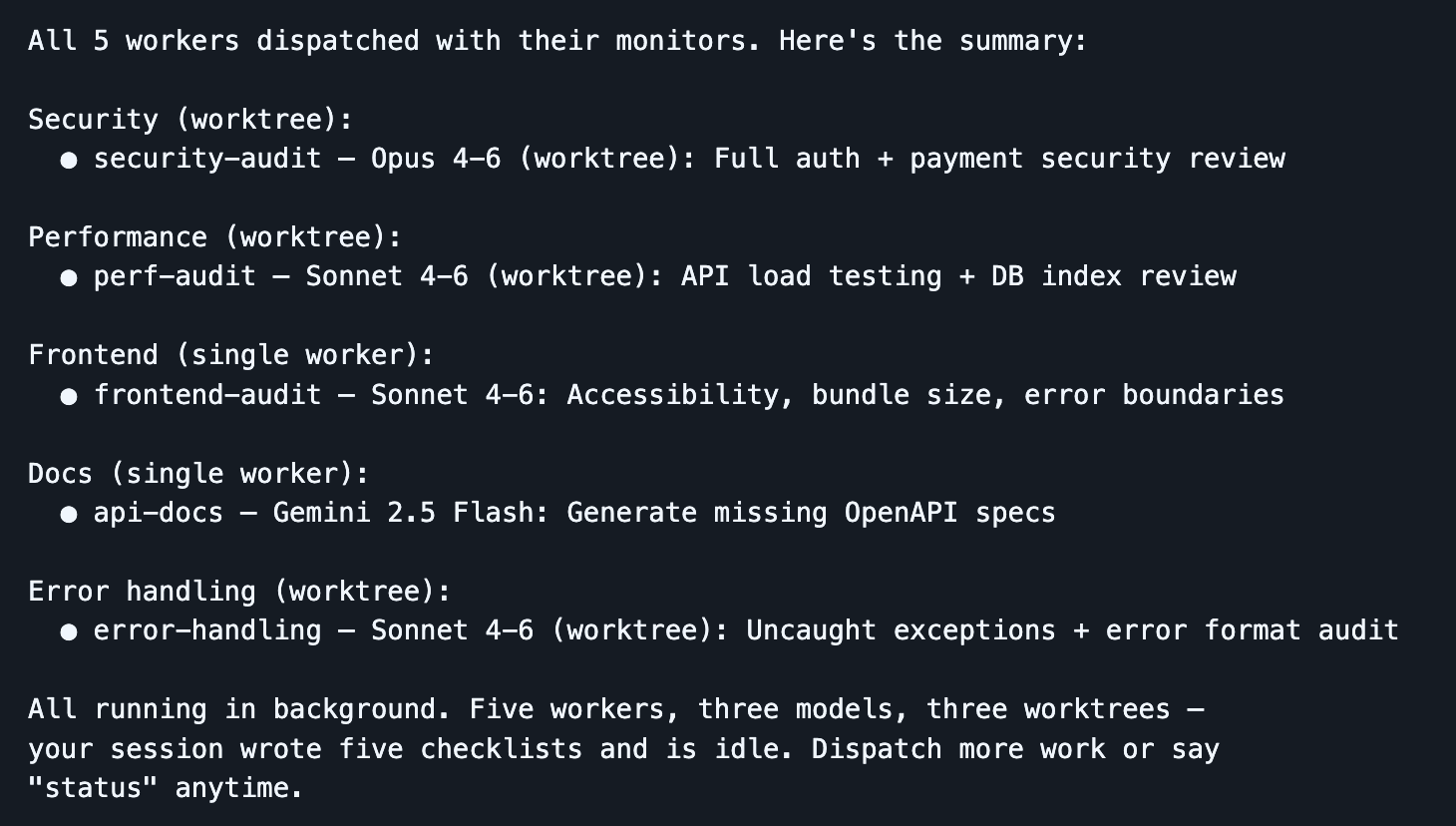
The tool I've been using heavily for this is Dispatch, a Claude Code skill I built that turns your session into a command center. You stay in one clean session while workers do the heavy lifting in isolated contexts. The dispatcher plans, delegates, and tracks, so your main context window is preserved for orchestration. When a worker gets stuck, it surfaces a clarifying question rather than silently failing.
Dispatch runs locally, which makes it ideal for rapid development where you want to stay close to the work: faster feedback, easier to debug interactively, and no infrastructure overhead. Ramp's Inspect is the complementary approach for longer-running, more autonomous work: each agent session spins up in a cloud-hosted sandboxed VM with the full development environment. A PM spots a UI bug, flags it in Slack, and Inspect picks it up and runs with it while your laptop is closed. The tradeoff is operational complexity (infrastructure, snapshotting, security), but you get scale and reproducibility that local agents can't match. I'd say use both (local and cloud background agents).
One pattern that's been surprisingly powerful at this level: use different models for different jobs. The best engineering teams aren't staffed with clones. They're staffed with people who think differently, trained by different experiences, bringing different strengths. The same logic applies to LLMs. These models were post-trained differently and have meaningfully different dispositions. I routinely dispatch Opus for implementation, Gemini for exploratory research, and Codex for review, and the cumulative output is stronger than any single model working alone. Think wisdom of crowds, but for code.
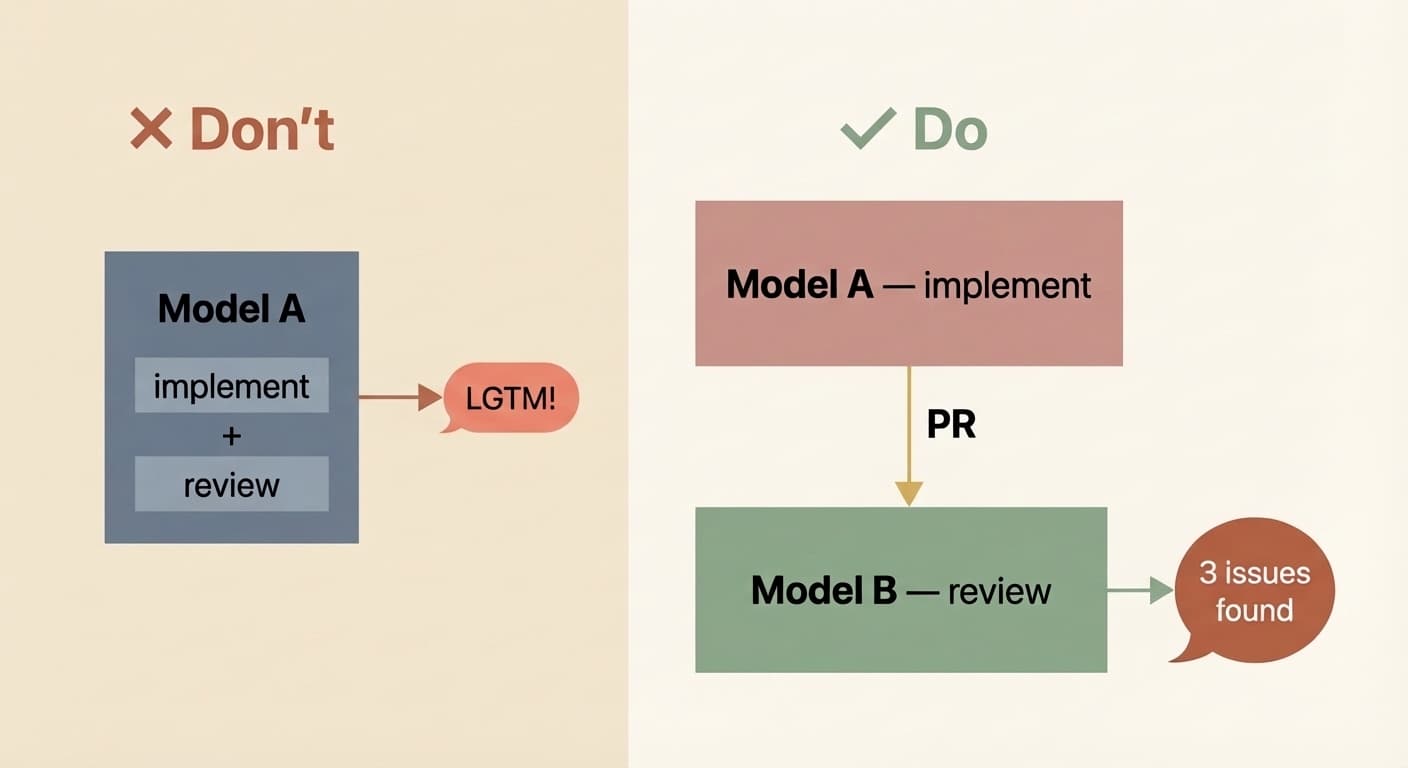
Critically, you also need to decouple the implementer from the reviewer. I've learned this the hard way too many times: if the same model instance implements and evaluates its own work, it's biased. It will gloss over issues and tell you all tasks are complete when they aren't. It's not malice, it's the same reason you don't grade your own exam. Have a different model (or a different instance with a review-specific prompt) do the review pass. Your signal quality goes way up.
Background agents also open the floodgates for combining your CI with AI. Once agents can run without a human in the chair, trigger them from your existing infrastructure. A docs bot that regenerates documentation on every merge and raises a PR to update CLAUDE.md (we do this and it's a huge time saver). A security reviewer that scans PRs and opens fixes. A dependency bot that actually upgrades packages and runs the test suite rather than just flagging them. Good context, compounding rules, capable tools, and automated feedback loops, now running autonomously.
Level 8: Autonomous Agent Teams
Nobody has mastered this level yet, though a few are pushing into it. It's the active frontier.
In Level 7, you have an orchestrator LLM dispatching work to worker LLMs in a hub-and-spoke pattern. Level 8 removes that bottleneck. Agents coordinate with each other directly, claiming tasks, sharing findings, flagging dependencies, and resolving conflicts without routing everything through a single orchestrator.
Claude Code's experimental Agent Teams feature is an early implementation: multiple instances work in parallel on a shared codebase, where teammates operate in their own context windows and communicate directly with each other. Anthropic used 16 parallel agents to build a C compiler from scratch that can compile Linux. Cursor ran hundreds of concurrent agents for weeks to build a web browser from scratch and migrate their own codebase from Solid to React.
But look closely and you'll see the seams. Cursor found that without hierarchy, agents became risk-averse and churned without progress. Anthropic's agents kept breaking existing functionality until a CI pipeline was added to prevent regressions. Everyone experimenting at this level says the same thing: multi-agent coordination is a hard problem and nobody is near optimal yet.
I honestly don't think the models are ready for this level of autonomy for most tasks. And even if they were smart enough, they're still too slow and too token-hungry for it to be economical outside of moonshot projects like compilers and browser builds (impressive, but far from clean). For the work most of us do day to day, Level 7 is where the leverage is. I wouldn't be surprised if Level 8 becomes the prevailing pattern eventually, but right now Level 7 is where I'd put my energy (unless you're Cursor and the breakthrough is the business).
Level ?
Inevitable what's next question.
Once you're adept at orchestrating agent teams without much friction, there's no reason the interface has to stay text-only. Voice-to-voice (thought-to-thought, maybe?) interaction with your coding agent — conversational Claude Code, not just voice-to-text input — is a natural next step. Look at your app, describe a sequence of changes out loud, and watch them happen in front of you.
There's a crowd chasing the perfect one-shot: state what you want and the AI composes it flawlessly in a single pass. The problem is that this presupposes we humans know exactly what we want. We don't. We never have. Software has always been iterative, and I think it always will be. It's just going to get much easier, stretch well beyond plain text interactions, and be a heck of a lot faster.
So: what level are you on? And what are you doing to get to the next one?
What level are you?
1 / 7
How do you typically start a coding task with AI?
Enjoyed this post?
Subscribe for more AI Engineering posts.